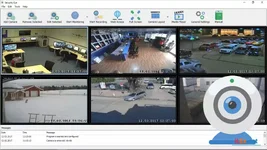
Screencapt is a powerful, professional-grade screen recording solution for Windows that combines ease of use with high-end technical capabilities. Whether you are producing high-definition tutorials, capturing high-stakes gaming sessions, or recording critical webinars, Screencapt provides the precision and flexibility required for modern digital content creation. With support for ultra-smooth frame rates and advanced overlay features, it is the ideal tool for anyone looking to turn their screen activity into professional video content.
Flexible Capture and Integrated Multimedia
Screencapt offers total control over your recording area. You can choose to capture your entire screen, a specific application window, or a custom-selected region. To make your videos more engaging, the software allows you to seamlessly integrate a Webcam Overlay directly into your recording, allowing your audience to see your reactions and commentary in real-time. Audio is handled with equal precision, letting you record system sounds and microphone commentary simultaneously for perfect synchronization.High-Performance Recording for Gamers and Pros
Engineered for speed, Screencapt supports a maximum frame rate of 120 FPS (frames per second). This ensures that even the most fast-paced gaming action or complex software animations are captured with fluid, stutter-free detail. To keep file sizes manageable without sacrificing clarity, the software utilizes the industry-standard H.264 codec. Users can fine-tune compression levels to achieve the perfect balance between high-fidelity image quality and optimized storage space.Advanced Cursor Effects and Professional Output
For educators and software demonstrators, Screencapt includes dedicated Cursor Tracking tools. You can choose to hide the cursor for a cinematic look or apply visual effects to highlight clicks and movements, ensuring your viewers never miss a step. Once your recording is complete, you can export your work in MP4, AVI, or FLV formats, making your content ready for instant upload to YouTube, social media, or professional presentation platforms.Key Feature Highlights
- 120 FPS Support: Capture ultra-smooth footage, ideal for high-speed gaming and action.
- Picture-in-Picture: Add your webcam feed to any screen recording for a personal touch.
- H.264 Efficiency: High-quality video with smart compression to save disk space.
- Dual-Channel Audio: Record system audio and your microphone at the same time.
- Precision Cursor Tools: Add click effects or hide the mouse for professional tutorials.
- Multi-Format Export: Save your videos in popular formats like MP4, AVI, and FLV.
- User-Friendly Interface: Designed for efficiency, from quick captures to advanced setups.
Screencapt: Phần Mềm Quay Màn Hình 120 FPS Chuyên Nghiệp
Screencapt là giải pháp quay phim màn hình mạnh mẽ dành cho Windows, giúp bạn ghi lại mọi hoạt động trên máy tính một cách chính xác và mượt mà. Với khả năng hỗ trợ tốc độ khung hình lên đến 120 FPS và tích hợp Webcam, đây là công cụ hoàn hảo cho các Streamer, Game thủ và những người sáng tạo nội dung giáo dục muốn tạo ra những video hướng dẫn chất lượng cao.Tính Năng Nổi Bật
- Quay Phim 120 FPS Siêu Mượt: Đảm bảo mọi chuyển động trong game và ứng dụng đều chi tiết, không bị giật lag.
- Tích Hợp Webcam: Hiển thị khuôn mặt và phản ứng của bạn ngay trên video quay màn hình để tăng tính tương tác.
- Ghi Âm Đa Kênh: Thu âm thanh hệ thống và giọng nói từ micro cùng lúc với độ đồng bộ hoàn hảo.
- Hiệu Ứng Chuột Thông Minh: Làm nổi bật các cú nhấp chuột hoặc ẩn con trỏ để video hướng dẫn trở nên chuyên nghiệp hơn.
- Chuẩn Nén H.264 Tiên Tiến: Giữ nguyên độ sắc nét của hình ảnh trong khi dung lượng file lại cực kỳ tối ưu.
- Xuất File Đa Định Dạng: Hỗ trợ các định dạng phổ biến nhất hiện nay như MP4, AVI và FLV.
- Tùy Chọn Vùng Quay Linh Hoạt: Quay toàn màn hình, một cửa sổ ứng dụng cụ thể hoặc chỉ một vùng được chọn.
✿ ❁ ✿

Geometric Glovius Prime
6.7.0.182